Weekday And Weekend Rates
Before You Start
Section titled “Before You Start”- Plan or add-on: All plans, Car Rental module.
- Hidden settings: Enable Rates per day of the Week and Enable Rates per day of the Week for Hourly Rates are hidden until you turn on Show Advanced Settings.
How It Works
Section titled “How It Works”Which Rates Use Days Of The Week
Section titled “Which Rates Use Days Of The Week”- Only rates with Decreasing Rate Based on Interval (Per Day) = Yes can change by day. A rate with a fixed Daily Rate costs the same every day.
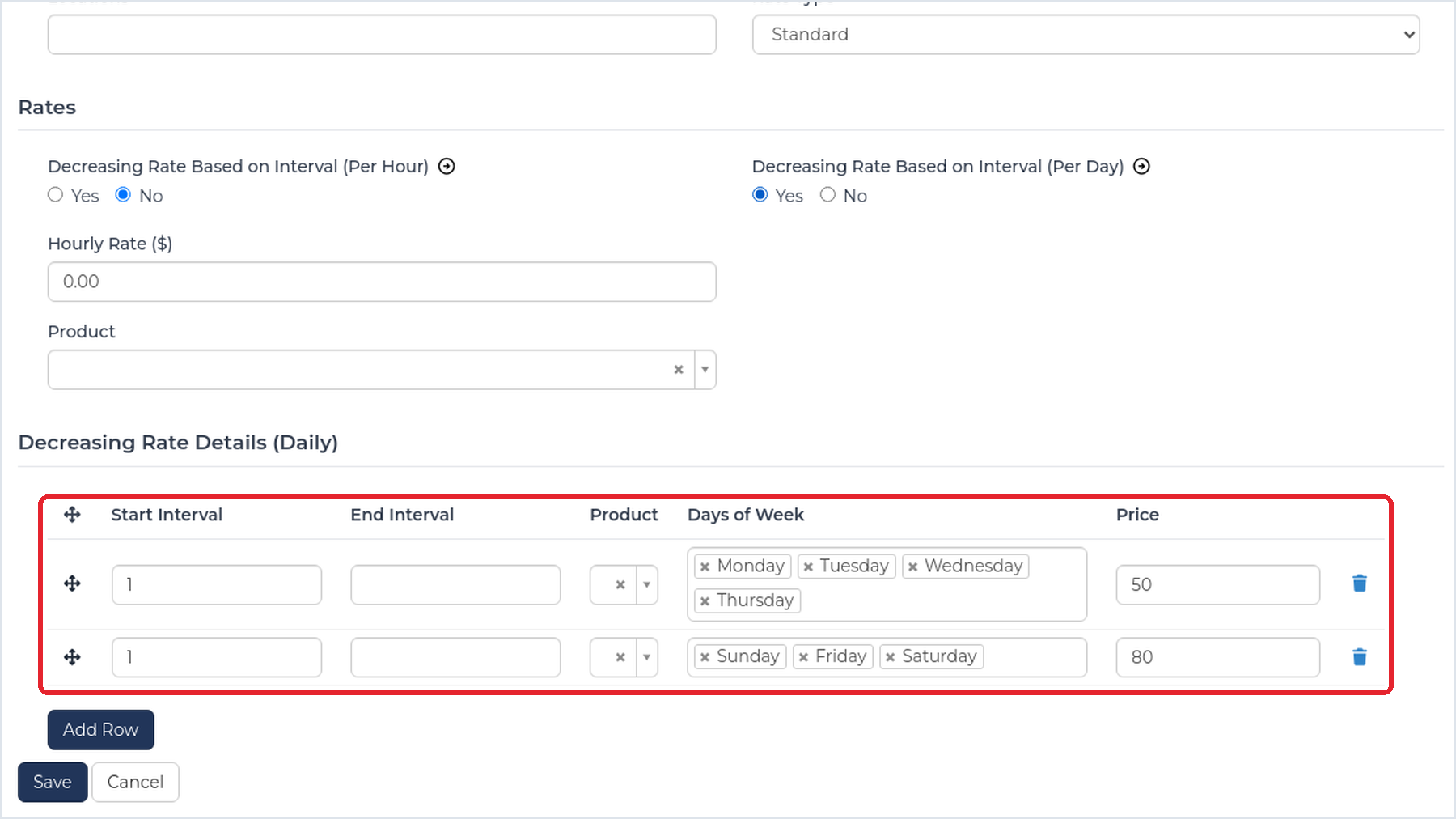
- Each line of the rate gets a Days of Week field. An empty field means every day.
- There is no weekend setting. The weekend is the days you pick on the lines.
How A Line Is Chosen For Each Day
Section titled “How A Line Is Chosen For Each Day”HQ prices each chargeable day, starting with the pickup day. It uses the first line from the top that matches the length of the whole rental and that day. If no line matches, HQ uses the first line.
The reservation shows the average price per day. The Total is still the sum of each day’s price.
Example: A rate has two lines from 1 day with no end: Monday to Thursday at $50 and Friday to Sunday at $80. A rental from Monday 10:00 to Sunday 10:00 has 6 chargeable days: 4 × $50 + 2 × $80 = $360. The reservation shows 6 days × $60.
Days In Different Seasons
Section titled “Days In Different Seasons”Each day uses the rate of the Season it falls in.
Example: Spring ends on a Friday, with a weekend price of $80. Summer starts on Saturday, with a weekend price of $120. Friday 10:00 to Sunday 10:00 costs $80 + $120 = $200, shown as 2 days × $100.
Hourly Rates
Section titled “Hourly Rates”With Enable Rates per day of the Week for Hourly Rates = Yes, the hourly lines also get Days of Week. Their intervals count hours. HQ uses the day on which the charged hours start.
Example: Saturday and Sunday cost $15 an hour and other days $10. Saturday from 09:00 to 13:00 costs 4 × $15 = $60. The same hours on a Tuesday cost $40.
Good To Know
Section titled “Good To Know”- The average price is rounded to Quantity of Decimals to Use in Rates, on the tab Advanced.
- The day of the week follows your account time zone.
- Saving the section Rates & Days Calculations with Enable Rates per day of the Week = Yes sets Enable Multiple Seasons Bookings to No. Each day still uses its own Season.
- With the Rate Calendar on, both settings in this article stay No.
- With Enable Weekly Rates on Decreasing Rates based on Intervals = Yes, full weeks use the Weekly Rate and the other days use the lines. The Monthly Rate is not used.
- With Enable Utilization Based Pricing = Yes, a line must also match the availability of the Vehicle Class.
If Something Goes Wrong
Section titled “If Something Goes Wrong”The Days Of Week Field Is Missing On The Rate
Section titled “The Days Of Week Field Is Missing On The Rate”- Why it happens: Enable Rates per day of the Week is No.
- What to do: Turn it on as shown in Set Weekday And Weekend Prices.
Weekend Days Are Charged At The Weekday Price
Section titled “Weekend Days Are Charged At The Weekday Price”- Why it happens: The rate does not use intervals, a line for every day sits above the weekend line, or no weekend line matches the rental length.
- What to do: Set Decreasing Rate Based on Interval (Per Day) to Yes, drag the weekend lines to the top and check Start Interval and End Interval.
The Daily Price Matches None Of My Prices
Section titled “The Daily Price Matches None Of My Prices”- Why it happens: HQ shows the average of all chargeable days.
- What to do: Nothing. Add up the price of each day to check the Total.
Enable Multiple Seasons Bookings Turned Itself Off
Section titled “Enable Multiple Seasons Bookings Turned Itself Off”- Why it happens: The settings page was saved with Enable Rates per day of the Week = Yes.
- What to do: Nothing. Rentals that cross Seasons still use the Season of each day.
Settings Used In This Article
Section titled “Settings Used In This Article”Both are hidden settings in Settings, under Car Rental, tab General Settings, section Rates & Days Calculations. Full details are in General Settings Reference Part 2.
- Enable Rates per day of the Week: adds Days of Week to the daily lines of every rate.
- Enable Rates per day of the Week for Hourly Rates: adds Days of Week to the hourly lines of every rate.