Dynamic And Demand-Based Pricing
Before You Start
Section titled “Before You Start”- Plan or add-on: All plans, Car Rental module.
- Hidden settings: Enable Utilization Based Pricing is hidden until you turn on Show Advanced Settings.
How It Works
Section titled “How It Works”Which Rates Use It
Section titled “Which Rates Use It”- Only rates with Decreasing Rate Based on Interval (Per Day) or (Per Hour) = Yes. A fixed Daily Rate never changes with demand.
- Each line of the rate gets Minimum Availability % and Maximum Availability %.
How Availability Is Measured
Section titled “How Availability Is Measured”Availability is the free vehicles of the class for the requested dates, divided by all vehicles of the class. It is rounded down to a whole number. Extra bookings allowed by Allowed Overbooking Quantity do not count as free.
Example: A class has 10 vehicles and 2 are free for the dates, so availability is 20%. With 1 free out of 3, it is 33.33%, counted as 33.
How A Line Is Chosen
Section titled “How A Line Is Chosen”HQ uses the first line from the top that fits the rental length and the availability. Both ends of a band count. An empty minimum means 0 and an empty maximum means 100. If no line matches, HQ uses the first line.
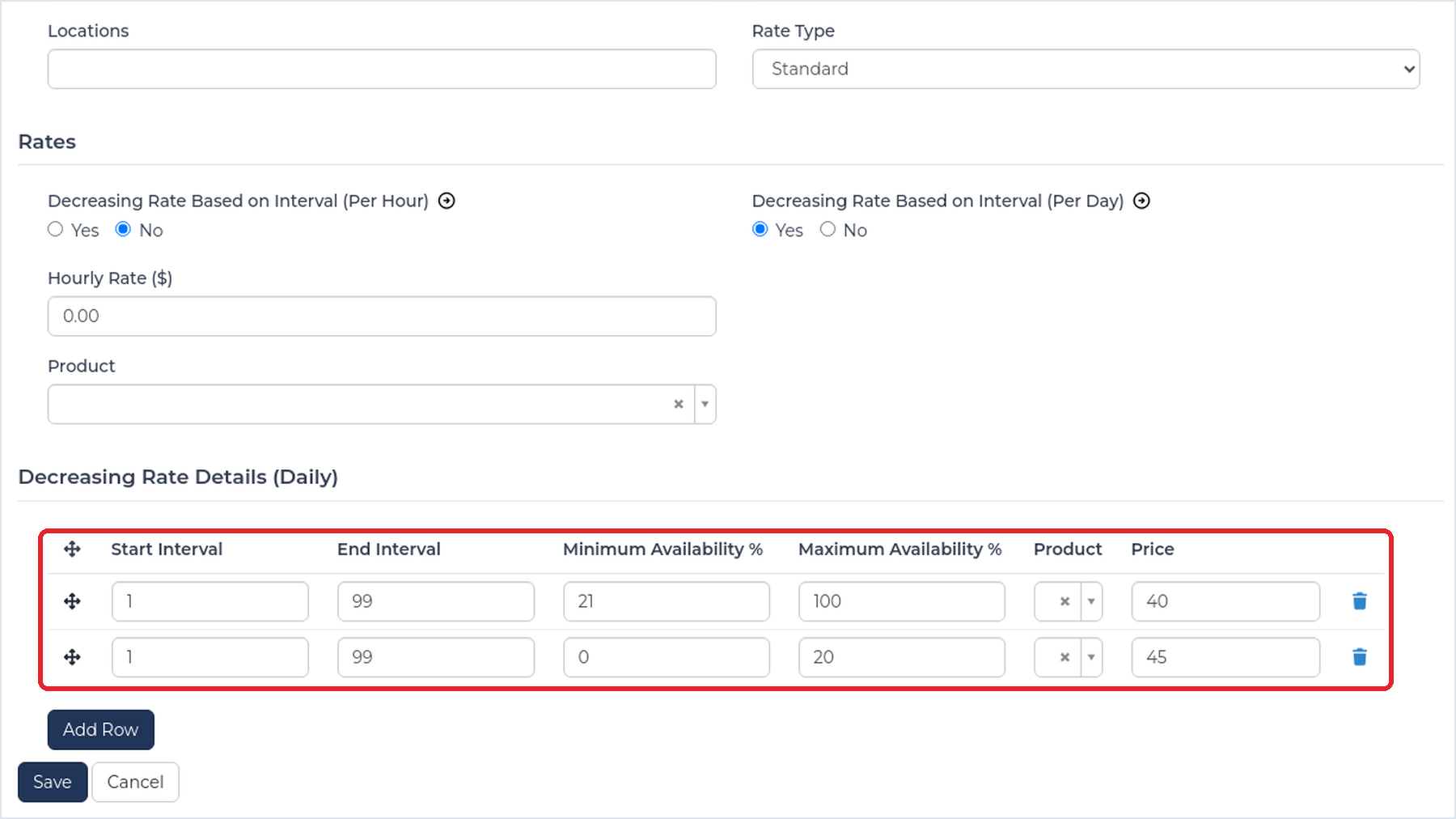
Example: A rate has a line from 21% to 100% at $40 and a line from 0% to 20% at $45. A 3 day rental with 5 of 10 vehicles free costs 3 × $40 = $120. With 2 of 10 free, it costs 3 × $45 = $135.
When The Price Is Fixed
Section titled “When The Price Is Fixed”HQ measures availability when the reservation is created and keeps it. Recalculating the same reservation uses the kept value. Changing its Vehicle Class measures again for the new class.
Example: A reservation made at 50% availability keeps the $40 line, even after the class fills up.
Good To Know
Section titled “Good To Know”- With Enable Rates per day of the Week = Yes, each day uses the first line that also matches its day of the week.
- With Enable Availability Calculations = No, every class counts as 100% free.
- The Rate Calendar cannot add or change availability bands. Use them on dates priced by Seasons.
If Something Goes Wrong
Section titled “If Something Goes Wrong”The Price Did Not Go Up When The Fleet Filled Up
Section titled “The Price Did Not Go Up When The Fleet Filled Up”- Why it happens: The reservation was created when more vehicles were free, the rate uses a fixed Daily Rate, or a higher line also matches.
- What to do: Use interval lines on the rate and drag the line you want checked first to the top.
Every Booking Gets The Same Price
Section titled “Every Booking Gets The Same Price”- Why it happens: Enable Availability Calculations is No, or the bands leave a gap, so the first line is used.
- What to do: Turn availability calculations on, or close the gap. For example, use 0 to 20 and 21 to 100.
Settings Used In This Article
Section titled “Settings Used In This Article”- Enable Utilization Based Pricing: adds availability bands to the interval lines of every rate. Hidden setting in Settings, under Car Rental, tab General Settings, section Rates & Days Calculations.
- Enable Availability Calculations: counts free vehicles. Same tab, section Availability.