Taxes
Before You Start
Section titled “Before You Start”- Plan or add-on: All plans, Car Rental module.
How It Works
Section titled “How It Works”The Three Taxes
Section titled “The Three Taxes”- Location Fee: a percentage, shown with the Location Fee Label.
- Sales Tax: a percentage, shown with the Tax Label, like VAT.
- Government Tax: a fixed amount per day.
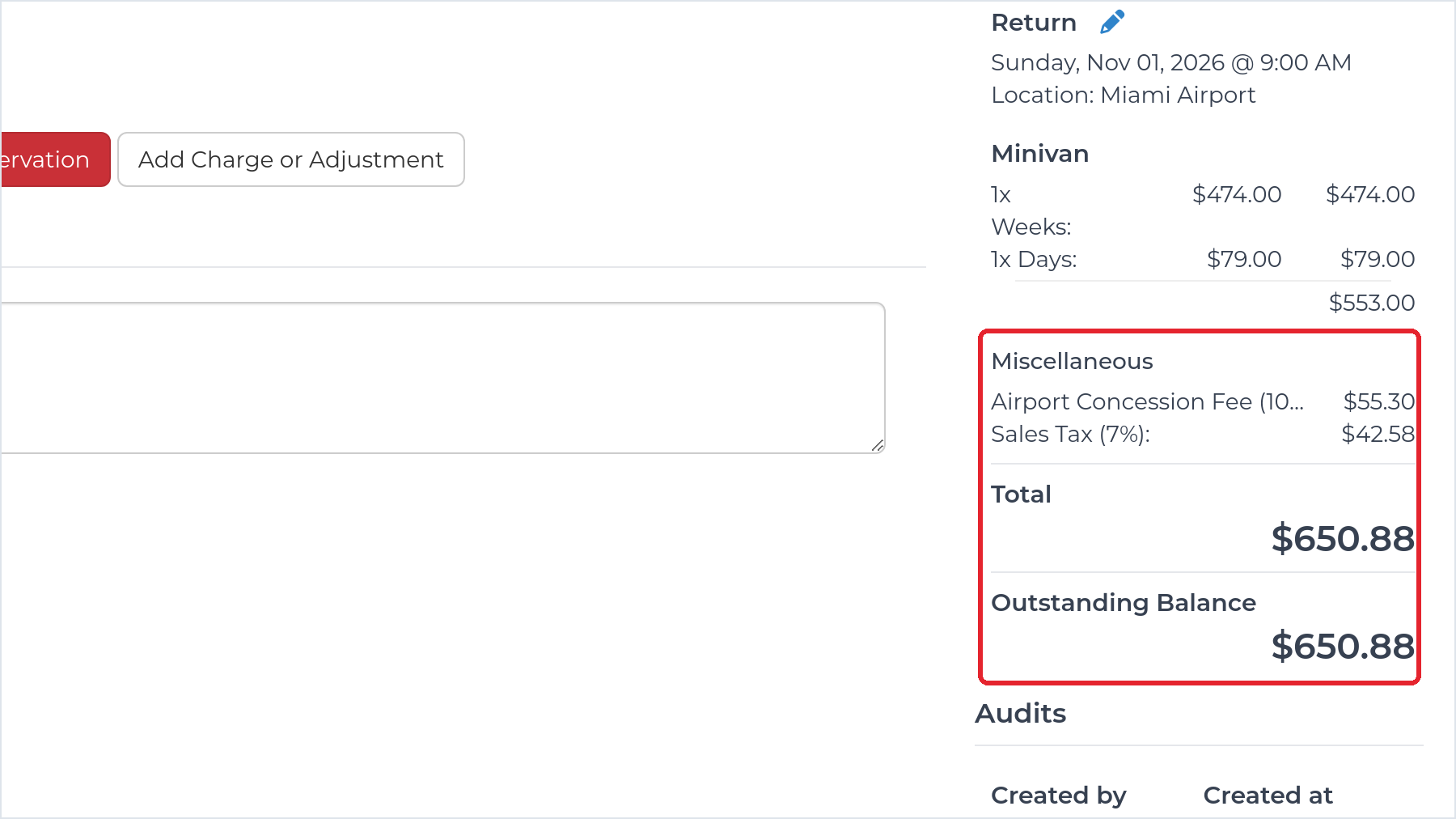
The summary shows them in Miscellaneous, with each percentage next to its name.
Example: A Minivan from Miami Airport costs $553. The Airport Concession Fee is 10% of $553 = $55.30. The Sales Tax is 7% of $553 + $55.30 = $42.58. The total is $650.88.
Which Rate Applies
Section titled “Which Rate Applies”- The pickup Location’s Tax (%) and Location Fee (%) win when filled. Otherwise the Branch’s apply.
- The Government Tax always comes from the Branch.
- The return Location never changes the taxes.
Example: The Branch has 7% Sales Tax. Miami Airport has no Tax (%) of its own, so it uses 7%, but it has its own 10% Location Fee.
Prices Are Before Tax
Section titled “Prices Are Before Tax”All prices in HQ are entered before tax. Taxes are added on top, after discounts.
Example: A $100 daily rate with 7% Sales Tax costs the customer $107 a day.
Good To Know
Section titled “Good To Know”- A reservation keeps the tax rates it had when created. New rates apply to new reservations.
- To charge another tax, create an Additional Charge with Tax Charge? = Yes.
- Tax Rates and Tax Settings under Settings, Items are for invoices, products and inventory. They do not change reservation prices.
If Something Goes Wrong
Section titled “If Something Goes Wrong”The Tax On A Reservation Is Not The Branch’s
Section titled “The Tax On A Reservation Is Not The Branch’s”- Why it happens: The pickup Location has its own Tax (%), or the customer has their own tax in their business rules.
- What to do: Clear the Location field to use the Branch.
I Changed The Tax But Old Reservations Did Not Change
Section titled “I Changed The Tax But Old Reservations Did Not Change”- Why it happens: Reservations keep the rates saved when they were created.
- What to do: Change the reservation to another customer or another Branch. HQ then loads the current rates.