Seasons And Fallback Rates
Before You Start
Section titled “Before You Start”- Plan or add-on: All plans, Car Rental module.
How It Works
Section titled “How It Works”What A Season Is
Section titled “What A Season Is”- Every Season belongs to one Branch and has a Date Start and a Date End.
- Every rate belongs to one Season and one Vehicle Class (a group of vehicles you rent and price together).
- HQ uses the active Seasons whose dates overlap the rental days. On rentals longer than one day, the return day does not choose the Season.
- A Branch with only one Season uses it for every rental, whatever the dates.
- A Season chosen in Base Season for Multiplier Calculation is never picked by its dates.
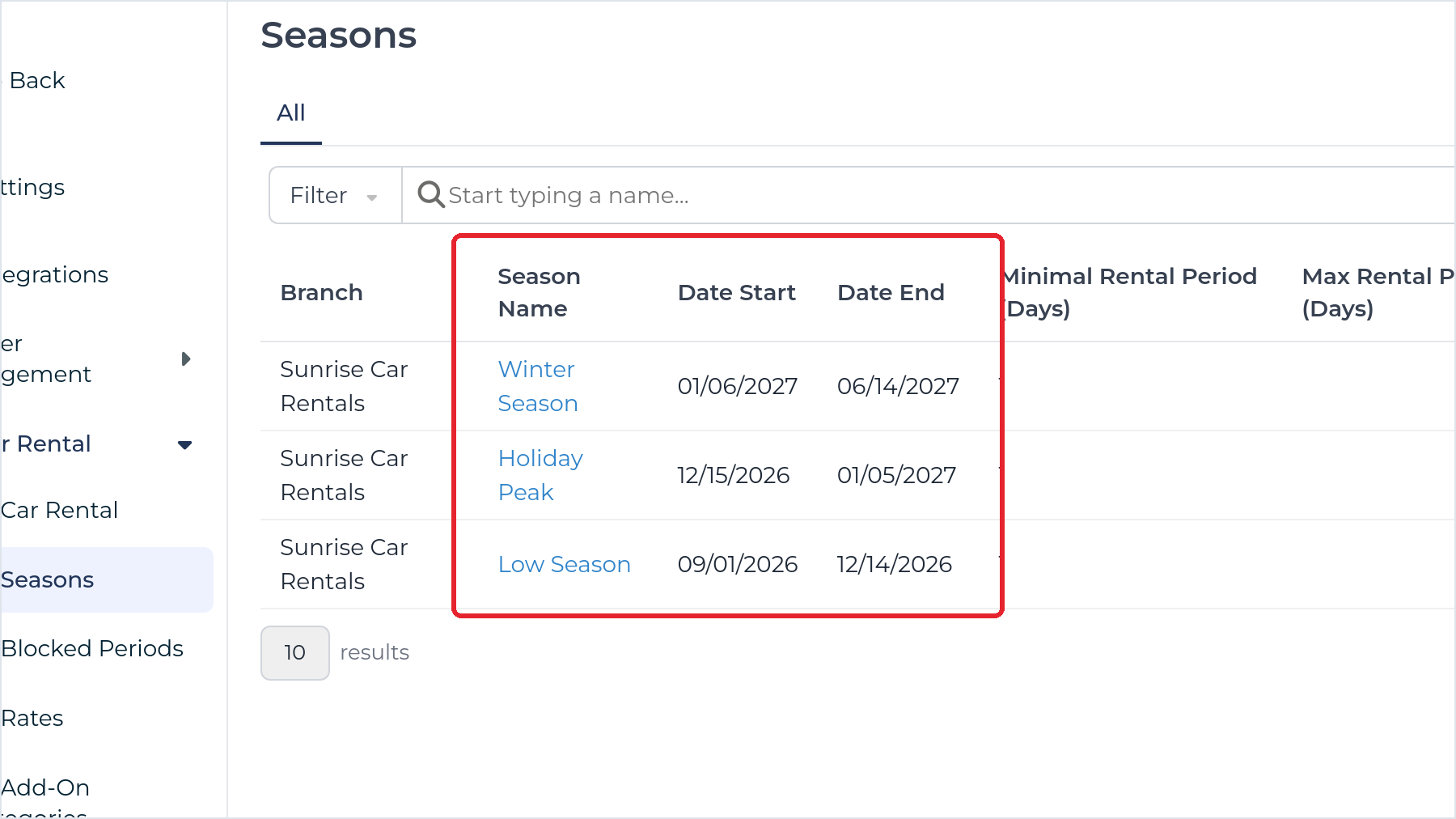
Example: Low Season runs from September 1 to December 14, 2026. Holiday Peak runs from December 15, 2026 to January 5, 2027, and Winter Season from January 6 to June 14, 2027.
- A rental from December 10 to December 13, 2026 uses Low Season rates.
- A rental from December 12 to December 15, 2026 also uses only Low Season, because the return day does not choose the Season.
Rentals Over Several Seasons
Section titled “Rentals Over Several Seasons”With Enable Multiple Seasons Bookings = Yes, each part of a rental uses its own Season. With No, the first Season prices the whole rental.
Example: August costs $100 a day and September $200. A rental from August 30 to September 2 costs $400 with Yes and $300 with No.
When No Season Or Rate Is Found
Section titled “When No Season Or Rate Is Found”- If no active Season covers any day, HQ uses the Fallback Season for not Found Seasons of the Branch. Without one, the reservation cannot be priced.
- If the Season has no rate for the Vehicle Class, HQ uses the Fallback Rate for not Found Rates. Without one, the Vehicle Class is not offered.
Example: Holidays has no Van rate. With a fallback Van rate of $90 a day, a 4 day Van rental costs $360.
Gaps And Overlaps
Section titled “Gaps And Overlaps”Seasons in a Branch should follow each other day after day. HQ still saves gaps and overlaps, and shows a warning on the Seasons page.
- With Enable Multiple Seasons Bookings = Yes, days after the last Season use its rate.
- With No, the first Season of the rental prices it all. With an overlap, that is the one with the earliest Date Start.
Example: A Season ends August 31 at $100 a day, with no Season after it. A rental from August 30 to September 2 costs 3 × $100 = $300.
Good To Know
Section titled “Good To Know”- A Season with reservations cannot be deleted. Set Active? to No instead. Inactive Seasons are not used for new reservations.
- Reservations imported from OTA connections always use the first Season of the rental.
If Something Goes Wrong
Section titled “If Something Goes Wrong”The Seasons Page Shows “Please Check Your Seasons”
Section titled “The Seasons Page Shows “Please Check Your Seasons””- Why it happens: Two Seasons in a Branch have a gap or an overlap between them.
- What to do: Change the dates so each Season starts the day after the previous one ends.
I Cannot Delete A Season
Section titled “I Cannot Delete A Season”- Why it happens: Reservations use the Season. HQ shows “This season can’t be deleted because it has Reservations that depend on them”.
- What to do: Set Active? to No.
Settings Used In This Article
Section titled “Settings Used In This Article”All are in Settings, under Car Rental, tab General Settings, section Rates & Days Calculations. Full details are in General Settings Reference Part 2.
- Enable Multiple Seasons Bookings: prices each part of a rental with its own Season.
- Fallback Season for not Found Seasons: the Season used when none covers the rental.
- Fallback Rate for not Found Rates: the rate used when a Season has none for a Vehicle Class.